 Start free on macOS
AI voice keyboard
The AI voice keyboard for iPhone and iPad.
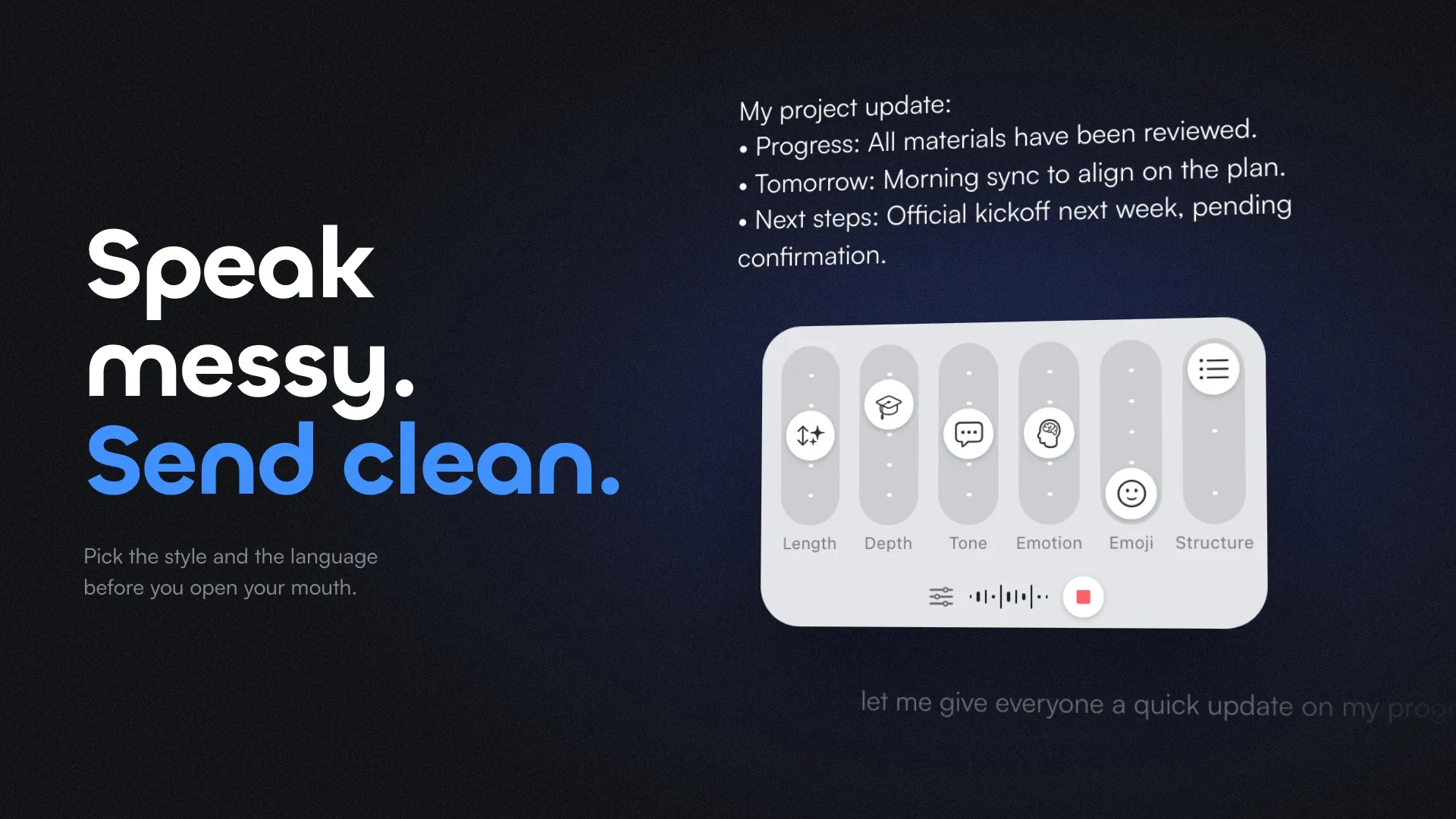
KeycoBoard is an AI voice keyboard for iPhone and iPad: tap the microphone, speak, and the written result fills the text field you are in, without leaving the app. Six sliders and a target language shape the result before or while you talk, and everyday typing works offline, for free, without Full Access.
How it works
- 01
Add the keyboard
Install KeycoBoard from the App Store on iOS 16.6 or later. In Settings → General → Keyboard → Keyboards, add KeycoBoard and turn on Allow Full Access for voice and AI features. Typing alone does not need Full Access.
- 02
Tap the microphone and talk
In any field that accepts third-party keyboards, switch to KeycoBoard and tap the microphone. Since version 1.1.9, recording runs inside the keyboard by default, so you stay in the app you are writing in. The first time, the app opens once to ask for microphone permission.
- 03
Set the style, then stop
Before or during recording, move the six sliders for length, depth, tone, emotion, emoji and structure, or pick a target language. When you stop, the settings in place at that moment are used and the result is written into your field.
A full keyboard, not just a microphone
Keep recording when the keyboard hides
Turn on Keep Recording When Keyboard Hides in the app’s Voice settings, and you can dismiss the keyboard, switch apps or lock the phone mid-sentence. The app keeps recording in the background through Picture in Picture, and a Live Activity on the Lock Screen and in the Dynamic Island shows the timer and progress. When it finishes, open the keyboard to insert the result or discard it.
Clipboard history and phrases
Text you just copied can appear in the candidate bar when the keyboard opens, so one tap pastes it. The Clipboard panel keeps recent copies next to your saved Phrases and iOS text replacements. Both clipboard options are off until you turn them on, need Full Access and stay on your device.
Candidates in the order you want
Long-press a Chinese Pinyin candidate and choose Move to Top, or Reset Order to forget what the keyboard learned about it. These choices change only the learning records on this device, not the built-in dictionary.
Layouts for iPhone, iPad and iPhone Duo
The keyboard sizes itself to the space iOS gives it: a shorter layout in iPhone landscape, a full-width layout for iPad voice typing and writing, and the wide layout on the iPhone Duo inner screen. On wide layouts, turn on Split Keyboard in the keyboard’s input settings to type with a half for each thumb.
Free, offline typing
Typing in Chinese (Pinyin), English, Spanish, Italian, French, German and Russian works without Full Access, a network connection or an account, and it costs nothing. Only voice input, rewriting and translation go online.
Rewrite and translate from the same keyboard
Swipe to the slider page to rewrite selected text or the whole field, or translate it into one of 45 languages and regional variants. The same six sliders apply.
Requirements and limits
Platforms, permissions, processing and pricing.
- Requires iOS 16.6 or later on iPhone and iPad. On Mac (macOS 14 or later), KeycoBoard works through keyboard shortcuts instead of a keyboard.
- Voice input, rewriting and translation need Full Access and an internet connection. Basic typing works offline without Full Access.
- Each recording can last up to five minutes. With Keep Recording When Keyboard Hides off, hiding the keyboard discards the recording. With it on, the finished result waits in the keyboard for an hour.
- Stop and cancel buttons in the Live Activity need iOS 17 or later; on iOS 16.6, tap the Live Activity to open the app and stop there.
- Split Keyboard is available on wide layouts, such as the docked iPad keyboard and the iPhone Duo inner screen, and only with the full keyboard, not the nine-key layout.
- iOS switches to the system keyboard in password fields, and some apps block third-party keyboards.
- The Free plan includes 30 uses a month, shared across voice typing, rewriting and translation. Pro makes them unlimited with standard models for US$29.99 a year or US$3.99 a month.
Questions
Is KeycoBoard a voice keyboard for iPhone?
Yes. It is a third-party keyboard for iPhone and iPad with a microphone key. Since version 1.1.9 it records inside the keyboard by default, so you do not leave the app you are typing in, and the result is written into the current field.
Does voice typing work on iPad?
Yes. On iPad the keyboard uses a full-width layout, and on the docked keyboard you can turn on Split Keyboard. Voice typing, rewriting and translation work the same way as on iPhone.
Can I keep talking after the keyboard closes?
Only with Keep Recording When Keyboard Hides turned on. The app then keeps recording in the background through Picture in Picture, and the Lock Screen and Dynamic Island show its progress. With the option off, hiding the keyboard discards the recording.
Is the keyboard free?
Typing is free and works offline without Full Access. Voice typing, rewriting and translation share 30 free uses a month; Pro makes them unlimited with standard models for US$29.99 a year or US$3.99 a month.
How is it different from Apple Dictation on the iPhone keyboard?
Apple Dictation transcribes what you say. KeycoBoard lets you set length, tone, structure and a target language before or while you speak, and uses the text around your cursor as context, so the result can arrive as a finished message.
Compare your options
Features, limits and prices, with sources.
Keep exploring
Setup and FAQ · Privacy and processing
Try it in your own text field.
Free to start on Mac, iPhone and iPad with 30 shared uses a month. Pro is US$29.99/year or US$3.99/month. See pricing